In modern web development, APIs (Application Programming Interfaces) are a crucial part of building scalable, efficient, and responsive applications. An API exposes certain functionality that other systems can consume through HTTP requests and responses. When implementing these APIs, developers can choose between synchronous and asynchronous approaches, each with its own set of characteristics, benefits, and challenges. This article will explore the differences between synchronous and asynchronous APIs, their benefits, use cases, and performance implications.
This article provides a concise comparison of synchronous and asynchronous APIs in ASP.NET Core, illustrated with practical code examples. Understanding the nuances of each approach is crucial for building performant and scalable web applications.
1. Synchronous APIs: Blocking and Straightforward
Synchronous APIs operate in a blocking manner. When a client sends a request, the server processes it and the client waits until a response is received. This model is simple to implement but can lead to performance bottlenecks under heavy load.
Code Example (Synchronous):
using Microsoft.AspNetCore.Mvc;
using System.Collections.Generic;

[ApiController]
[Route("api/[controller]")]
public class ProductsController : ControllerBase
{
    [HttpGet("sync")]
    public IActionResult GetProductsSync()
    {
        // Simulate retrieving products (e.g., from a database)
        var products = new List<string> { "Product A", "Product B", "Product C" };

        return Ok(products); // Return the products
    }
}
Analysis:
- The
GetProductsSyncmethod handles a GET request. - It simulates retrieving products and returns them.
- The key characteristic is that the thread executing this method is blocked while processing the request. This means the server can’t handle other requests with that thread until this one completes.
2. Asynchronous APIs: Non-Blocking and Scalable
Asynchronous APIs, in contrast, allow the server to handle multiple requests concurrently. When a client sends a request, the server initiates the processing but immediately returns control to the client. The client can continue with other tasks, and the server will notify the client when the processing is complete.
Code Example (Asynchronous):
using Microsoft.AspNetCore.Mvc;
using System.Collections.Generic;
using System.Threading.Tasks;

[ApiController]
[Route("api/[controller]")]
public class ProductsController : ControllerBase
{
    [HttpGet("async")]
    public async Task<IActionResult> GetProductsAsync()
    {
        await Task.Delay(1000); // Simulate a 1-second delay

        var products = new List<string> { "Product A", "Product B", "Product C" };

        return Ok(products); // Return the products
    }
}
Analysis:
- The
GetProductsAsyncmethod is marked with theasynckeyword, indicating it’s asynchronous. Task.Delay(1000)simulates a long-running operation (like a database query). Crucially, theawaitkeyword does not block the current thread. Instead, the method execution pauses, and the thread is freed up to handle other requests. Once the delay completes, the method resumes execution.- The return type is
Task<IActionResult>, a requirement for asynchronous actions.
Key Differences and When to Use Which
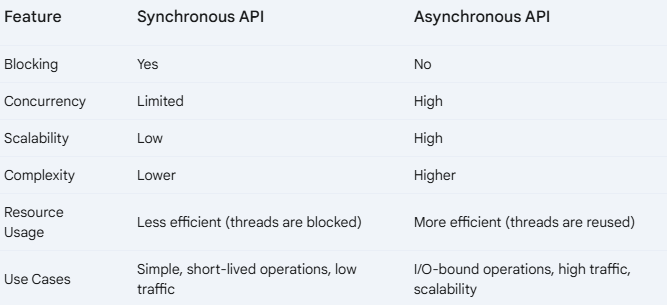
When to use Synchronous APIs:
- Simple, Short-Lived Operations: If the operation is quick and computationally inexpensive (e.g., basic calculations, retrieving data from memory, simple data transformations), a synchronous API is often sufficient. The overhead of asynchronous programming might outweigh the benefits for such tasks.
- Low Traffic/Low Concurrency: If your application isn’t expected to handle a large number of concurrent requests, the blocking nature of synchronous APIs might not be a significant issue. The simplicity of implementation can be a worthwhile trade-off.
- CPU-Bound Operations (Sometimes): If the operation is heavily CPU-bound and doesn’t involve waiting for I/O, a synchronous approach might be slightly more efficient in some cases. However, even CPU-bound tasks can benefit from asynchronous patterns if they are long-running and you want to prevent blocking the entire server. This is less common, but worth considering.
- Simplicity is Key: When developer time is a significant constraint and the performance requirements are not extremely demanding, synchronous APIs can be easier to implement and maintain.
When to use Asynchronous APIs:
- I/O-Bound Operations: This is the most common and most important reason to use asynchronous APIs. I/O operations (like database queries, network requests, file system access) involve waiting. Asynchronous APIs prevent the server from blocking a thread while waiting for these operations to complete. This allows the server to handle many more requests concurrently.
- High Traffic/High Concurrency: If your application anticipates a large volume of concurrent requests, asynchronous APIs are essential for scalability and responsiveness. They allow your server to efficiently manage resources and avoid bottlenecks.
- Long-Running Tasks: Even if an operation is CPU-bound, if it takes a considerable amount of time, using an asynchronous approach prevents blocking the server and improves the user experience.
- Improved Responsiveness: By not blocking the main thread, asynchronous APIs keep your application responsive. Users don’t have to wait for one request to complete before initiating another.
- Microservices and Distributed Systems: In microservice architectures, services frequently communicate with each other over the network. Asynchronous communication is crucial for decoupling services and ensuring that one slow service doesn’t bring down the entire system.
- Real-time Applications: For applications that require real-time updates or push notifications, asynchronous communication is often necessary.
In summary:
Synchronous APIs in ASP.NET 8 process requests sequentially, blocking the server thread until completion. This is simple to implement but can lead to performance issues under high load. Asynchronous APIs, using async and await, allow concurrent request handling by freeing up the server thread during I/O operations. This improves scalability and responsiveness. Choose synchronous for simple, low-traffic applications, and asynchronous for I/O-bound, high-traffic scenarios where performance is critical. Asynchronous APIs are crucial for building scalable and responsive web applications and microservices.